
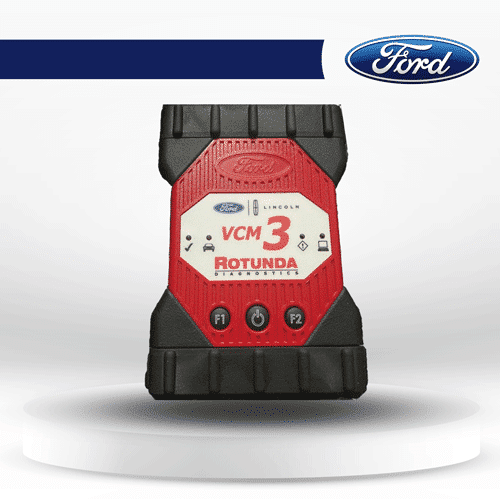
Ford VCM3 Original VCI - OEM Diagnostic Interface for Ford IDS
Shop the Ford VCM3 original diagnostic tool. OEM-level interface for Ford IDS, supports advanced vehicle diagnostics. Official Rotunda VCI available now!

Description
Ford VCM 3 (VCM3) Original Diagnostic Tool – Official Rotunda VCI
The Ford VCM 3 (VCM3) is the latest official OEM diagnostic interface from Rotunda, designed for use with Ford IDS and FDRS software. It’s the direct replacement for the older VCM II and is now the standard tool used by dealerships and authorized repair shops worldwide. If you’re a professional technician or independent workshop owner, the VCM 3 gives you the same dealer-level access that Ford service centers rely on.
✅ Key Features:-
Full OEM Compatibility – Works seamlessly with Ford IDS and FDRS software.
-
Next-Generation Hardware – Faster connection, more stable performance, and enhanced vehicle coverage compared to VCM II.
-
CAN-FD & DoIP Support – Future-proof design to handle the latest Ford and Lincoln vehicles.
-
Durable Design – Built to OEM standards for workshop reliability.
-
Multi-Protocol Support – J2534 pass-thru compliant for a wide range of diagnostic tasks.
Learn more about Ford diagnostic tools
🔧 Supported Functions:-
Read & clear DTCs (diagnostic trouble codes)
-
Module programming and configuration
-
Live data monitoring and recording
-
Service functions, resets, and adaptations
-
Full coverage of Ford & Lincoln models
-
Ford VCM 3 (VCM3) Original Diagnostic Unit
-
OBD-II Cable & USB Connection
-
Official Rotunda packaging
-
12-month warranty & technical support
Unlike many technical product pages, let’s break down what the Ford VCM 3 actually offers in plain language:
-
Full Coverage for Ford & Lincoln
Works with all modern Ford and Lincoln vehicles. Whether it’s a basic service reset or advanced module programming, the VCM 3 covers it. -
Future-Proof Technology
Supports CAN-FD (newer high-speed communication standard) and DoIP (Diagnostics over IP), meaning it’s ready for next-generation Ford vehicles. -
J2534 Pass-Thru Compliant
The VCM 3 isn’t locked to Ford only – it also works as a J2534 device, letting you use other OEM software that requires a pass-thru interface. -
Fast & Reliable
Improved hardware over the VCM II means faster programming times, fewer communication errors, and a more stable connection. -
Built to Last
Rugged housing and workshop-grade connectors ensure it can handle tough environments without breaking down.
In short: it’s faster, more reliable, and compatible with the latest vehicles, making it an essential upgrade for any workshop serious about Ford diagnostics.
🖥️ Installation RequirementsTo get the most out of your Ford VCM 3, you’ll need the right setup:
-
Software
-
IDS (Integrated Diagnostic Software): Used mainly for older Ford vehicles.
-
FDRS (Ford Diagnostic and Repair System): Required for newer models.
Both software packages can be installed and activated with our remote support service.
-
-
Computer Requirements
-
Windows 10 or Windows 11 Professional (64-bit recommended)
-
Minimum 8 GB RAM (16 GB preferred for heavy programming tasks)
-
USB 2.0/3.0 port and internet connection for updates
-
-
Licensing
A valid Ford IDS or FDRS subscription is required for full functionality. We guide customers on how to purchase and activate licenses. -
Setup Process
-
Connect VCM 3 to the computer via USB.
-
Install IDS or FDRS software.
-
Connect to the vehicle’s OBD-II port.
-
Run software updates to ensure compatibility.
-
Our engineers can assist with remote installation so your workshop can be ready within hours.
🔄 Comparison: Ford VCM 3 vs VCM IIMany technicians still use the VCM II, but it’s quickly becoming outdated. Here’s how the VCM 3 improves on its predecessor:
-
Speed – VCM 3 offers faster module programming and data transfer.
-
Coverage – Supports new CAN-FD and DoIP protocols, which VCM II cannot handle.
-
Stability – Reduced risk of connection drops during critical programming.
-
Longevity – Ford is phasing out VCM II support; VCM 3 is the official replacement.
👉 If you already own a VCM II, it may still work for older vehicles, but for long-term workshop growth and modern cars, the VCM 3 is the clear choice.
🛠️ Common Troubleshooting TipsEven with OEM tools, technicians sometimes face setup challenges. Here are quick solutions:
-
VCM 3 not detected by PC
→ Ensure USB drivers are installed. Try a different port or cable. -
Software license error
→ IDS/FDRS requires a valid subscription. Confirm your login credentials and license status. -
Slow performance
→ Use a laptop with at least 16 GB RAM and SSD storage. Avoid background programs during programming. -
Connection drops during programming
→ Use a stable power supply for the vehicle. Low battery voltage is a common cause. -
Can’t connect to latest models
→ Update your FDRS to the latest version and confirm VCM 3 firmware is updated.
With our support, most setup issues are resolved remotely in less than 30 minutes.
🏆 Why Buy from Us?-
Official & Original: Guaranteed OEM Rotunda hardware.
-
Expert Engineers: Remote installation & technical support included.
-
Fast Delivery: Shipped from our trusted warehouse with tracking.
-
Warranty Included: Full 12-month warranty for peace of mind.
When you invest in the Ford VCM 3 through TechRoute66, you’re not just buying a tool — you’re gaining dealer-level diagnostic power and expert support.
Upgrade your workshop capabilities today with the original Ford VCM3 — the trusted diagnostic interface for Ford and Lincoln vehicles.
🙋 Frequently Asked Questions (FAQs)
Q: Can I use Ford VCM 3 with both IDS and FDRS?
Yes. IDS supports older models, while FDRS is required for newer vehicles. The VCM 3 works with both.
Q: Does VCM 3 support programming modules?
Yes. It allows full module programming, configuration, and updates, just like Ford dealerships.
Q: Is this tool original or a clone?
This is the genuine OEM Rotunda VCM 3, not a clone. It comes with official warranty and packaging.
Q: What happens if I don’t have a Ford software license?
You’ll need an IDS or FDRS license. Our team can guide you on how to purchase and activate it.
Q: Can you install the software for me?
Yes. Our engineers provide remote installation & activation so your workshop is ready without hassle.